DNS Record Types Explained
You type a URL into your browser, hit enter, and a website loads. Simple from the outside. But behind that one action, a surprisingly involved lookup process happens — your computer is essentially asking a global directory system "where does this actually live?" multiple times before a single byte of the website reaches you. DNS is that directory system, and DNS records are the individual entries inside it. Most developers interact with DNS when setting up a domain for the first time and immediately get confused by all the record types staring back at them — A, CNAME, MX, TXT, NS. This post breaks down what each one actually means and when you'd use it.
What is DNS ?
DNS stands for Domain Name System, it acts as internet’s phonebook.
Assume that you open google.com in your browser, browser does not understand word “google.com”. Browsers communicate using numerical IP addresses. You could remember a value like 192.2.4.8, but even if you learned one IP address, remembering IPs for daily-used services such as Instagram, YouTube, WhatsApp, and X (formerly Twitter) would become insanely difficult.
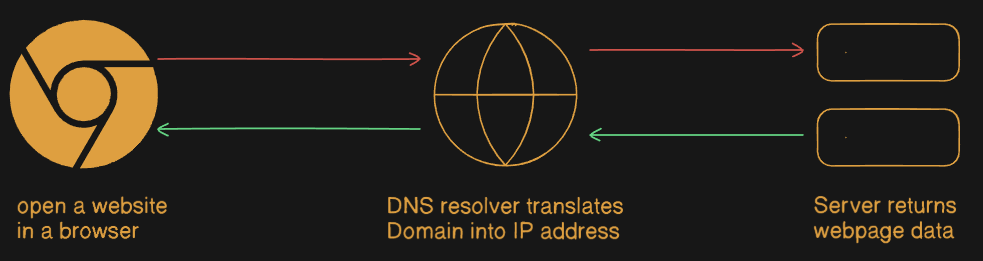
This problem is solved by DNS, DNS translates Human-readable Domain into Machine-readable IP Addresses. Purpose of DNS is to make Internet user-friendly, when a user enters a domain name in a browser DNS takes responsibility of finding correct IP address that is associated with that domain and eliminate need to remember IP Addresses and enable browser to locate servers automatically.
Why DNS records are needed ?
DNS records are the basic instructions that are required to domain mapping that if domain has been searched in browser then DNS records helps to determine that what will information provide about domain including IP address and how to handle request for the Domain. These records consist of a series of text files written in what is known as DNS syntax. DNS syntax is just a string of characters used as commands that tell the DNS server what to do.
for example you are entering in a supermarket, there are different sections are labelled different products. labels help us to find where the product is, that you need to buy. if you want clothes there is a section for it. if you want shoes there is a different section.
Similarly DNS records work as a labelled sections. Each DNS record points to specific information that is related to domain and IP address. DNS records helps to point out the exact information of the domain which is required just same as the store section helps to find right product.
Most common types of DNS Records
NS Record
A Record
AAAA Record
CNAME Record
MX Record
TXT Record
Let’s learn more about the types of DNS records, what they are, and why they are used
1. NS Record
A name server is a type of DNS server which stores All DNS records for a Domain, including A record, MX record or CNAME record etc. DNS servers are authoritative for domain in simple terms, it tells the internet where to ask for correct DNS information of a domain without NS record DNS would not know that which server is responsible.
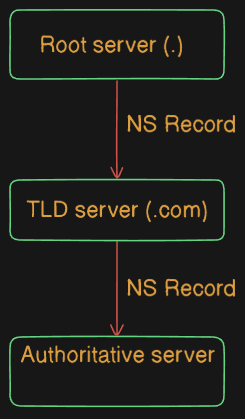
for example name server work like a shopkeeper whose shop is at junction of 4 streets shopkeeper know the streets, person who want to go at a specific address ask first to the shopkeeper about address and shopkeeper direct them to address without shopkeeper the person will wander here and there without knowing the right direction.
2. A Record
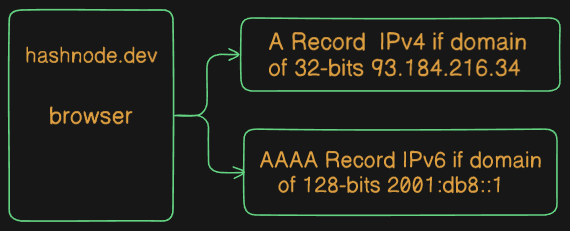
“A” stands for Address and this is the most fundamental type of DNS record. It maps a domain name to an IPv4 address. It tells the DNS system the exact IP address where a website or service is hosted. IPv4 was used in the initial stages of the internet and widely used today.
IPv4 address uses a 32-bit address if we assume 2³² is almost equal to 4.3 billon, Dotted-decimal notation and every block contain values from 0-255 for example: 192.168.1.1. Internet is exploded in very short time so it became insufficient to meet demand.
3. AAAA Record
A DNS AAAA record maps a domain name to an IPv6 address. It serves the same purpose as an A record, but instead of pointing to an IPv4 address, it points to an IPv6 address. When a domain is accessed over an IPv6-enabled network, the DNS system uses the AAAA record to provide the IPv6 address of the server so the browser can connect to it.
IPv6 uses 128-bit addresses an almost unlimited number of IP addresses and was introduced to overcome the limited address space of IPv4. A common question that arises is why the internet moved directly from IPv4 to IPv6 and what happened to IPv5. IPv5 was an experimental protocol called the Internet Stream Protocol (ST), created for research purposes such as real-time voice and video transmission. IPv5 did not solve the problem of IP address exhaustion, which was the main limitation of IPv4.
Because IPv5 was not suitable for large-scale internet addressing, it was never deployed publicly. When the need arose to support a massive number of devices, a completely new version IPv6 was designed instead which is known as AAAA Record.
4. CNAME Record
CNAME stands for “Canonical name”, CNAME Record points from an alias domain to a parent domain. All CNAME Record must point to a domain, never points to an IP address. Imagine how a postman finds your house in your colony, postman first ask a person where the address is ? person would know correct street but not the exact house address, once on that street postman ask resident of that street as they must know the house address.

Similarly, a CNAME Record does not have the IP address itself. It points to another domain that has an A record, That domain will provides the actual IP address. In simple terms, a CNAME resolves a subdomain by pointing it to another domain, not to an IP.
For example, blog.example.com may have CNAME record pointing to example.com, DNS resolution returns the IP address of example.com, After connection is made, the web server checks the requested hostname (blog.example.com) and serves blog page instead of giving homepage.
5. MX Record
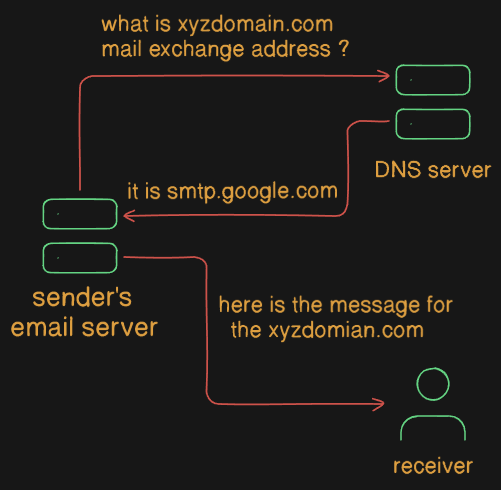
MX (Mail exchanger) record a type of DNS Record that tells email servers where to send mail which is coming for a domain, it acts like a digital address for your email, directing messages to the correct mail server. if there will no MX Record mail sent from a domain may be filtered as a SPAM by a mail server. It becomes important for receiving the email, without it, email server won’t know where to deliver your emails.
For example, if your friend send you a courier without mentioning the delivery address, it becomes insanely difficult for the delivery person to know where to deliver it. Similarly, without an MX record, email servers would not know which mail server is responsible for receiving emails for a domain.
6. TXT Record
TXT (text) Record is a flexible type of Domain Name System record that stores human-readable or machine-readable text about domain. primarily used for verifying ownership, email security and other domain related services. unlike other DNS Records TXT Record do not control traffic routing, they provide instructions and verification data.
imagine a house which is having a nameplate, people who know the person and belongs to the person will go inside the house similarly it work in TXT Record Who is allowed to send email, Whether the domain is verified, What security rules apply. TXT records do not point to IP addresses. TXT Records are meant to be machine readable, not by humans.
how all DNS Records work together for one website
DNS records have different roles, but they do not work independently. They depend on each other and operate as a single workflow when a website is accessed. Let us see how DNS records work together when a website is opened.
When a user type a website URL like blog.hashnode.com into a browser, the process starts with a DNS resolver. the resolver’s job is to find the correct IP address so the browser can connect to the server.
First, the resolver contacts the DNS hierarchy from root to TLD servers and is directed to the authoritative name servers for that domain. These authoritative name server for the domain. These authoritative servers are identified using NS records, which tell the DNS system which servers are responsible for holding correct information for blog.hashnode.com
Once authoritative name server is reached, it checks requested domain name. If hostname is an alias for eg blog.hashnode.com, the server may return a CNAME record, which points request to hashnode.com DNS then resolves that target domain instead of returning an IP directly.
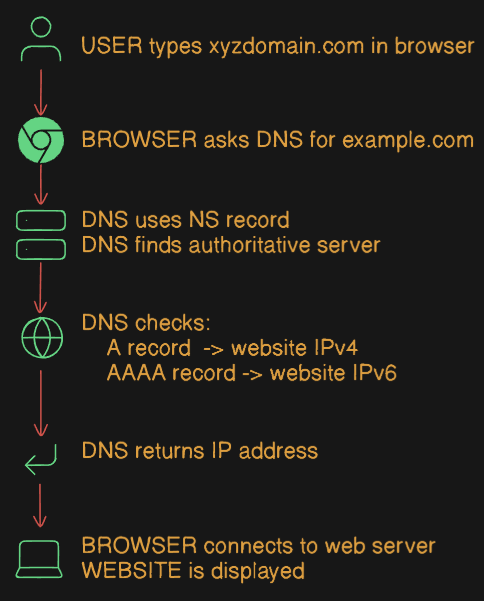
After resolving any CNAME, authoritative server provides A record (for IPv4) or AAAA record ( for IPv6). This record contains actual IP address of the server where the website is hosted. At this point, DNS resolution is complete, and the browser knows exactly where to send the request.
Before website access, if domain is used for email, MX records define which mail servers are responsible for receiving emails for domain. These records are not used for website loading but are essential for email delivery related to same domain.
At the same time, TXT records provide additional information such as domain ownership verification and email security rules. These records help other systems decide whether to trust emails or services with domain.
Finally, once the browser receives the IP address from A or AAAA records, it connects to the server. The web server then checks the requested domain (for eg, blog.hashnode.com) and serves correct website or page based on that domain.


