Inside Git: How It Works
Most people learn Git by memorizing commands. git add, git commit, git push — you type them enough times and they become muscle memory. But at some point something unexpected happens — a merge conflict, a detached HEAD, a reset that seemed to delete everything — and you realize you've been using Git without actually understanding what it's doing. That's where most of the confusion comes from. Git stops being scary the moment you understand what's happening under the hood. Not at a deep computer science level — just enough to know what Git is actually storing when you commit, and why the commands behave the way they do.
1. How Git works internally ?
Git is an independent software whose purpose is to act as version control system (VCS) for tracking changes in project’s code. To store and manage these changes, Git maintains its own internal storage inside the project. This storage is created as a hidden folder called .git in root directory when a repository is initialized.
The .git folder acts as Git’s internal database. It stores all information related to commits, branches, references, and complete history of project. This folder can be viewed using ls -a command in terminal, but it should never be edited manually, it may corrupt repository. All interactions with Git’s internal data are handle by Git commands.
Internally, Git tracks changes at the line by line not word by word, which helps to keep version history easy to manage. When changes are prepared using git add <filename>, Git records the file content internally into staging area. Later, these staged changes are saved as part of project’s history usinggit commit -m "description". This allows developers to understand what was updated over time through clear commit messages.
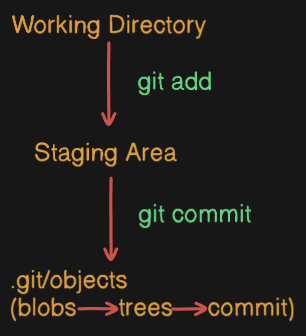
2. Understanding the .git Folder
the .git folder is hidden by default, it is possible to enter and inspect it using cd .git in the terminal. By navigating into the .git directory, developers can observe how Git stores and manages repository data. This directory contains everything which Git required to track history, branches, and commits.
The .git folder should not be edited manually, but reading its content help in understanding how Git works internally. Most of Git’s internal logic revolves around few key components, especially objects, references, HEAD, and logs.
let’s Study about what is inside .git Folder ?
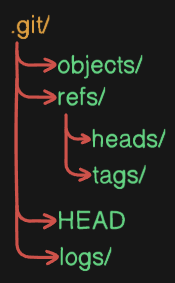
objects/
The objects directory stores all Git data using hashed objects. Each object is saved inside a folder named after the first two characters of its hash, with the remaining hash used as the file name. These files are compressed and not human-readable. To safely read an object’s content, Git provides the git cat-file -p <hash> command. This directory stores tree data, author, and parent commit as objects identified by unique hashes.
refs/
The refs directory stores references to commits. It mainly contains pointers for heads and tags. These references do not store the actual data but point to commit hashes, allowing Git to move between different points in history.
HEAD
The HEAD file is a reference that indicates the current position in the repository. It tells Git which branch is currently active and where the project is pointing in the commit history.
logs/
The logs directory keeps a record of changes made to references such as branches and HEAD. It tracks movements, such as branch switches and commits. This information is useful for understanding how repository state has evolved internally.
3. Git Objects: Blob, Tree, Commit
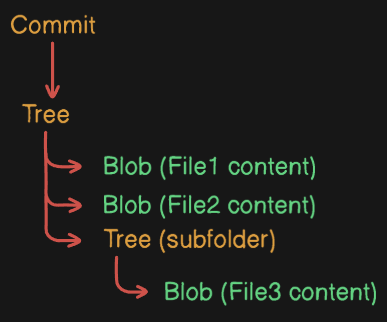
Git internally stores data using three main types of objects: Blob, Tree, and Commit. These objects work together to represent complete state and history of project.
Blob
A blob stores the actual content of a file. It does not store the file name or directory information—only the file’s data. If two files have same content, Git stores them as the same blob.
Tree
A tree object represents a directory structure. It maps file names to blob objects and directory names to other tree objects. This allows Git to track how files and folders are organized.
Commit
A commit object represents a snapshot of the project. It points to tree object and also stores metadata such as author, commit message, and reference to parent commit.
4. How Git Tracks Changes
git track changes using snapshot model. Each commit represents a complete snapshot of project at a specific time, capturing how entire code looks at that time. Git as a version control system treats every commit as a full project’s current state.
internally, Git optimizes its storage by reusing existing objects. if a file has not changed since previous commit, git does not create a new copy of that file. only modified files result in new objects created. each of these objects is identified using unique hash generate, which stands for if there is a small change produces a completely different hash.
these hashed objects are linked together a directory structure which is commonly known as tree and commit objects to form the project history. This design allow Git to maintain clear snapshot with a consistent snapshot for every commit. as a result, Git can quickly move between commit compare project’s current state and previous states and preserve complete history of a project with strong data integrity


