JavaScript Operators: The Basics You Need to Know
After variables and data types, operators are the next thing you run into — and they're everywhere. Every condition you check, every calculation you do, every comparison between two values — that's an operator doing its job. Most of them look familiar because they borrow from math and logic you already know. But JavaScript has a few operators that behave in ways that aren't obvious at first, and a couple that trip up even experienced developers if they're not paying attention. This post covers the ones you'll actually use constantly — arithmetic, comparison, logical, assignment — and more importantly, explains the parts that tend to cause confusion before they cause bugs in your code.
What are operators ?
JavaScript operators are symbols or keywords that are used to perform operations on different values and variables. they are the building blocks of JavaScript expressions and can manipulate data. operator enables tasks like arithmetic calculations, logical comparisons, and bitwise manipulations.
JavaScript has both binary and unary operators, and one special ternary operator, the conditional operator. A binary operator requires two operands, one before the operator and one after the operator. Values which are required to perform a operation by using operators are called operands :
4 + 3  // 7
4 (operand1) + (operator)  3 (operand2)
A unary operator requires a single operand, either before or after the operator:
++x  // operator operand
x++  // operand operator
Arithmetic operators
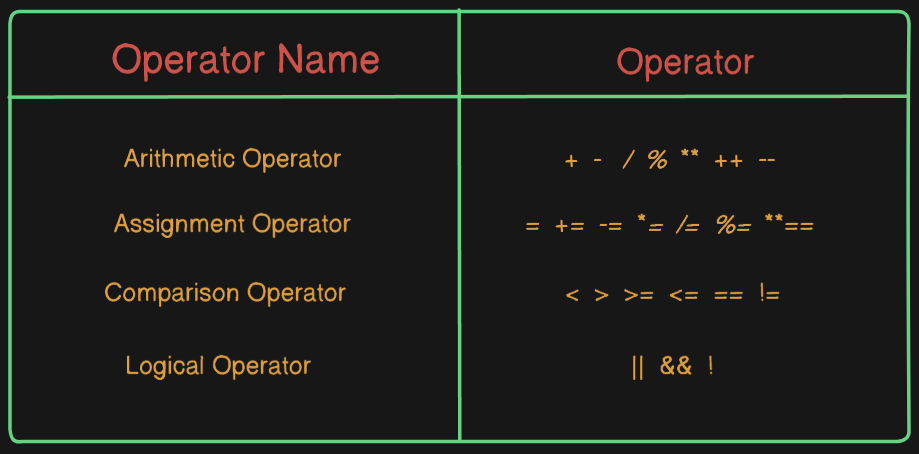
Arithmetic operators are the type of operators used to perform basic math operations like addition(+), subtraction(-), multiplication(*), Exponentiation(**), division(/), reminder(%). They are used with numeric variables to perform calculations in programs.
const add = 5 + 3;
console.log(add);               // 8

const subtract = 10 - 2;
console.log(subtract);         // 8

const multiply = 8 * 3;
console.log(multiply);        // 24

const exponential = 2 ** 2;
console.log(exponential);     // 4

const divide = 8 / 2;
console.log(divide);         // 4

const modulus = 4 % 2;
console.log(modulus);       // 0
Arithmetic operators work mainly with numeric values and are fundamental for calculations in programming, such as counters, totals, averages, and mathematical formulas.
Comparison operators
JavaScript comparison operators are essential tools for checking conditions and making decisions in your code. The result of evaluating an comparsion operator is always of type boolean based on comparison is true. Comparison operators are used to compare two values. Comparison operators always return true or false
1. Equality Operator (==) : This operator is used to compare equality of two operands.
console.log(5 == "5"); // true
2. Strict equality Operator (===) : This operator is used to compare equality of two operands with type.
console.log(5 === "5"); // false
3. Inequality Operator (!=) : this operator is used to compare inequality of two operands.
console.log(10 != "10"); // false
4. Greater than Operator (>) : This operator is used to check whether left-side value is greater than right-side value.
console.log(8 > 5); // true
5. Greater than or equal Operator (>=) : This operator is used to check whether left side operand is greater than or equal to right side operand.
console.log(3 < 7); // true
6. Less than Operator (<) : this operator is used to check whether left-side value is less than right-side value.
console.log(7 < 5); // false
7. Less than or equal Operator (<=) : This operator is used to check whether left side operand value is less than or equal to right side operand value.
Logical operators
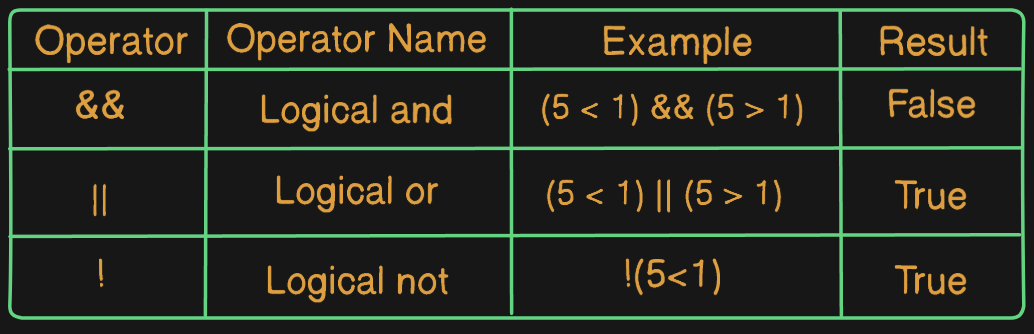
Logical operators are used to combine or modify boolean values to make decisions. Logical operators are used to combine two or more boolean expressions to get one result. They help to control program flow by evaluating one or more conditions are true or false. They are widely used in if statements, loops, and conditions. Logical operators make it easier to handle multiple conditions at once.
Logical AND (&&) Operator
The logical AND (&&) operator checks that both operands are true or not. If both are true, the result is true and it will run that block scope. If any one or both operands are false, the result is false than it will run that block scope
let age = 19;
let voterId = true;

if (age >= 18 && voterId) {            // true
  console.log("Allowed to vote");      // this block scope will run
} else {
  console.log("Not Allowed to vote");
}
Logical OR (||) Operator
The logical OR (||) operator checks at least one of operands is true. If first operand is truthy, it stops and returns that value. If the first operand is falsy, it evaluates the second operand and returns its value.
Falsy values: false, 0, null, undefined, NaN, and "" Truthy values: Anything not falsy.
let havingPass = false;
let isVIP = true;

if (havingPass || isVIP) {  // true
  console.log("Allowed");   // this block scope will run
} else {
  console.log("Not Allowed");
}
Logical NOT (!) Operator
The logical NOT (!) operator inverts the boolean value of its operand. If the operand is true, it returns false. If the operand is false, it returns true.
The NOT operator (!) returns true for false expressions and false for true expressions.
let isAllowed = true;

console.log(!isAllowed);   // false
Assignment operators
Assignment operators are used to assign values to variables in JavaScript. An assignment operator assigns a value to its left operand based on the value of its right operand. The simple assignment operator is equal (=), which assigns the value of its right operand to its left operand.
1. Addition Assignment Operator (+=)
This operator adds value to right operand to a variable and assigns result to variable. Addition or concatenation is possible. In case of concatenation then we use the string as an operand.
let x = 4;
const y = 5;

console.log(x); // 4


console.log(x += y ); // 9
2. Subtraction Assignment Operator (-=)
This operator subtracts the value of right operand from a variable and assigns its result to the variable.
let x = 8;

console.log(x -= 1); // 7
3. Multiplication Assignment Operator(*=)
This operator multiplies a variable by the value of right operand and assigns the result to the variable.
let x = 2;

console.log(x *= 4); // 8
4. Division Assignment Operator(/=)
This operator divides a variable by the value of the right operand and assigns the result to the variable.
let x = 20;
const y = 2;
console.log(x /= y);  // 10
5. Remainder Assignment Operator(%=)
The operator divides a variable by the value of the right operand and assigns the remainder to the variable.
let x = 50;
console.log( x %= 10);  // 0
6. Exponentiation Assignment Operator
The operator increases the value of a variable to the power of the right operand.
let a = 2
console.log(a **= 3); // 8