Synchronous vs Asynchronous JavaScript

When I was first learning JavaScript, I have wrote code the way most beginners do one line, then the next, then the next. Everything was in a order which made complete sense to me.
Then I saw the usecases of setTimeout how we can use it in our workflow and for the first time the output came out in a completely different order that I wrote it. I stared at the screen genuinely confused. I thought I'd made a mistake somewhere.
and this all turns out to me that I have just didn't understand how JavaScript actually executes code yet. Let me explain it properly.
Synchronous Code
Synchronous means your code runs line by line, in order, and each line waits for the previous one to finish before it starts.
console.log("Step 1")
console.log("Step 2")
console.log("Step 3")
Output:
Step 1
Step 2
Step 3
Obvious. Expected. Step 1 runs, finishes, then Step 2 runs, finishes, then Step 3. No surprises. This is synchronous execution predictable, top to bottom, one at a time. Now here's where it becomes a problem. What if one of those steps takes a long time?
console.log("Start")

// imagine this takes 5 seconds
const data = fetchDataFromDatabase()

console.log("Done")
In a synchronous world, your entire program freezes on that second line. Nothing else runs. The browser freezes. The UI stops responding. Users think the page is broken. All because one operation is slow and everything else is stuck waiting for it.
That's blocking. And it's exactly the problem asynchronous code was designed to solve.
Asynchronous Code
Asynchronous code says start this task, but don't wait for it to finish. Move on and come back when it's done.
console.log("Start")

setTimeout(() => {
  console.log("This ran after 2 seconds")
}, 2000)

console.log("End")
Output:
Start
End
This ran after 2 seconds
Wait "End" printed before the setTimeout ? Even though "End" is written after it in the code ?
Yes. Because setTimeout is asynchronous. JavaScript registered it, handed it off, and immediately moved to the next line. Two seconds later, the callback ran. The code didn't wait. It kept moving. That's the core idea.
Why JavaScript Needs This
JavaScript is single-threaded. One thread, one thing at a time. There's no "do two things simultaneously" at least not in the traditional sense. So when something slow needs to happen a network request, a file read, a database query you have two options:
Option 1: Wait for it. Block everything. Nothing else runs until it's done. This is synchronous behavior and it's terrible for user experience.
Option 2: Hand it off, move on, handle the result when it's ready. This is asynchronous behavior and it's how JavaScript was designed to work.
Think about a food delivery app. When you place an order, the app doesn't freeze until your food arrives. It shows you the confirmation screen, lets you browse other stuff, maybe sends you a notification when the rider is close. The order is being processed somewhere in the background. When it's done, you get told.
That's async. The app kept running while waiting on the slow thing.
Everyday Examples
API calls This is the most common one. When you fetch data from an external server, you don't know how long it'll take. Could be 100ms, could be 3 seconds on a bad connection. Synchronous code would freeze the browser the whole time. Async code lets the page stay responsive.
console.log("Fetching user...");

fetch("https://api.example.com/user/1")
  .then((response) => response.json())
  .then((user) => {
    console.log("Got user:", user.name);
  });

console.log("Request sent, moving on...");
Output:
Fetching user...
Request sent, moving on...
Got user: Ankur
The fetch went out, JavaScript moved on immediately, and handled the response when it came back. The page never froze.
Timers setTimeout and setInterval are async by nature. They register a callback and let JavaScript move on.
console.log("Before timer")

setTimeout(() => {
  console.log("Timer fired")
}, 1000)

console.log("After timer")
Output:
Before timer
After timer
Timer fired
The timer didn't block. Everything below it ran first, then the callback fired when the time was up.
File reads in Node.js Same idea on the backend. Reading a file takes time. Async file reading lets the server handle other requests while waiting.
const fs = require("fs");

console.log("Reading file...");

fs.readFile("data.txt", "utf8", (err, data) => {
  console.log("File content:", data);
});

console.log("Continuing with other work...");
Output:
Reading file...
Continuing with other work...
File content: (whatever's in the file)
Server kept working. File read happened in the background. Callback ran when done.
The Blocking Problem in Practice
Let me make the blocking problem more concrete with a side-by-side.
Imagine a server getting three requests at the same time. Each request needs to read a file that takes 1 second.
Synchronous (blocking):
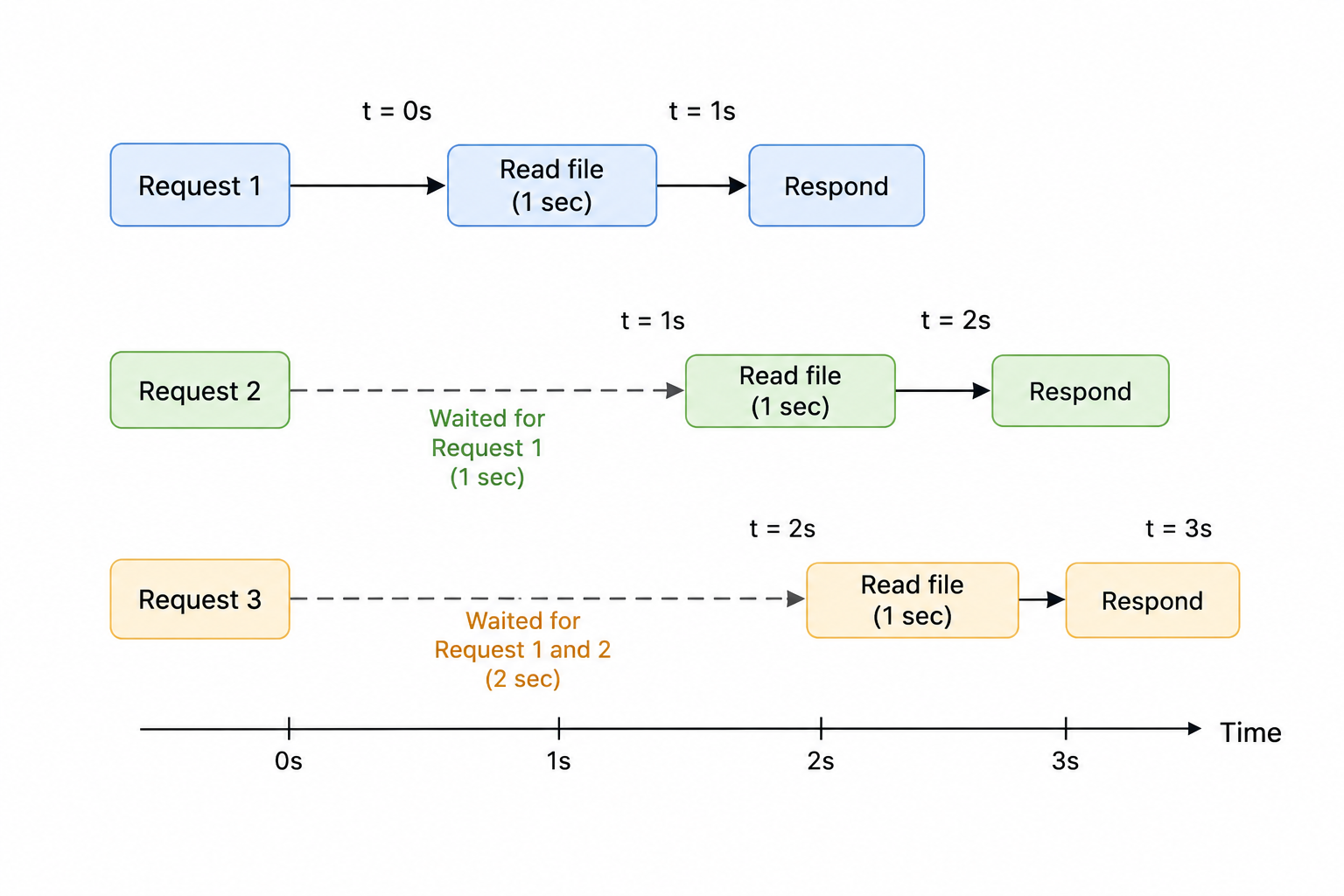
Total time: 3 seconds. Request 3 waited 2 seconds before even starting. On a real server with hundreds of requests, this gets catastrophic fast.
Asynchronous (non-blocking):
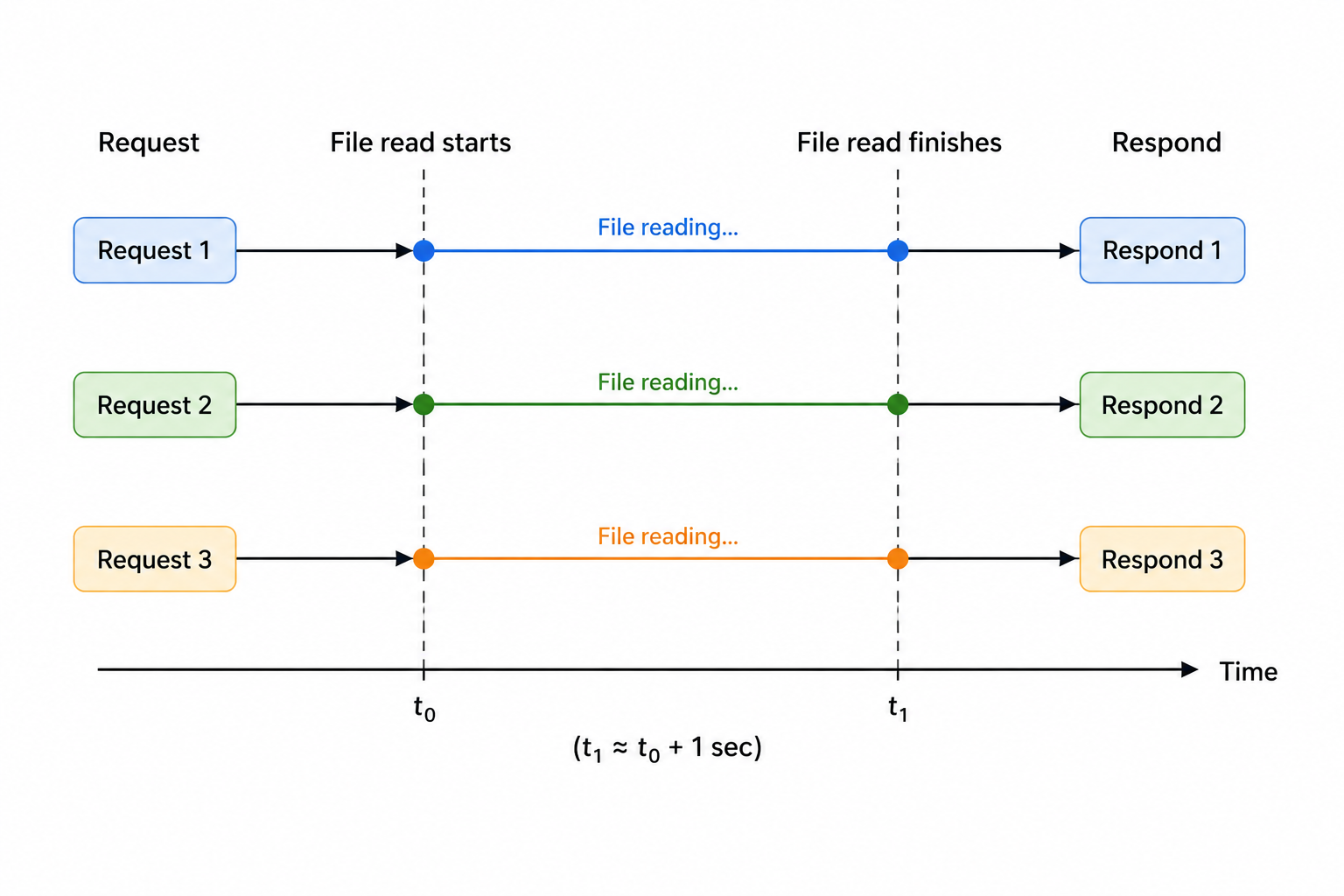
Total time: roughly 1 second. All three ran concurrently without blocking each other.
Same tasks, same files, completely different performance under load.
Synchronous Operations Are Not Always Bad
To be clear synchronous code isn't wrong. Most of your code is and should be synchronous. Calculations, string manipulation, loops, logic all of that is synchronous and that's fine.
The problem only shows up when something slow is involved. I/O operations anything that involves waiting on an external system are where async matters.
The rule of thumb: if your code is just processing data that's already in memory, synchronous is fine. If it's waiting on something outside your program a server, a file, a database go async.


