Understanding Variables and Data Types in JavaScript
Every program, no matter how complex, is doing something pretty simple at its core — storing values and doing things with them. A username, a price, a list of items, a true or false flag — all of that is data, and variables are how you hold onto it. If you're just starting out with JavaScript, variables and data types are genuinely the first thing worth getting right. Not just the syntax — the actual mental model of what a variable is, what kinds of values JavaScript can work with, and how the language thinks about them. Get this foundation solid and everything else — functions, objects, arrays, all of it — makes a lot more sense when you get there.
What variables are and why they are needed ?
In programming, we required a named storage location that holds and store data or values. Using variables, we can store the data in our program that we need to access in near future. A variable is basically a building block of a program which is used in expressions as a substitute in place of the value it stores.
for example it works same as sugar-container which stores sugar where sugar-container is a variable and sugar is treated like a data or values.
In programming, the declaration of variables involves specifying the type of data and name to the variables before it is used in the program. The syntax can vary slightly between the programming languages, but the fundamental concepts remains same.
How to declare variables using var, let, and const
The variables in java Script are used to store the data values. they can be declared in different way it's depends on how the values need to behave. variables can be declared using var, let and const only because java Script is dynamically typed so type of data is decided on run-time, you do not need to specify the type of data when you are creating a variable
var keyword
The var keyword is the older way which is used for declaring variables. and it is Function-scoped which means if you declare a variable inside a block like an if or for, it is still accessible outside that block.
var a = "Hello World!"
var b = 47

console.log(a) // Hello World
console.log(b) // 47

function testForVar() {
  if (true) {
    var x = 10;
  }
  console.log(x); // 10
}
var also allows re-declaration and reassignment. It is hoisted to the top of its scope and initialized with undefined.
let keyword
let is a keyword which is used to declare variables and let is block-scoped. It only exists inside the block { } where it is defined. let keyword reassignment is possible but it doesn't allows a re-declaration in the same scope.
let a = 8
console.log(a) // 8
 a = 12        // allowed
console.log(a) // 12
let a = 16     // not allowed
console.log(a) // give error

function testForLet() {
  if (true) {
    let x = 10;
  }
  console.log(x); // ReferenceError
}
It is hoisted but it shows not initialized. Accessing it before declaration causes a ReferenceError which is known as temporal dead zone.
const keyword
const is a keyword which is used to declare constant variables and it is Block-scoped, it is immutable which means that can't be reassigned, though objects can still mutate. It does not allow reassignment and must be initialized at the time of declaration.
const a = 5;
a = 10; // error

const arr = [1, 2, 3];
arr.push(4); // allowed
arr = [5, 6]; // error
However, if const holds an object or array, the contents can still be modified. Only reassignment is restricted.
Primitive data types
Primitive data types are the built-in data types provided by JavaScript. They represent single values and are not mutable. JavaScript supports the 7 type of primitive data types:
1. Number: used to store Number with decimals and without decimals.
let age = 20;          // integer
let price = 99.99;     // decimal

console.log(typeof age);    // number
console.log(typeof price);  // number
2. String: used to sequence of characters that are surrounded by single or double quotes.
let name = "Ankur";
let message = 'Hello World'

console.log(name)             // Ankur
console.log(typeof name);     // string
3. Undefined: This means a variable has declared but has not been assigned a value to it.
let data;

console.log(data);           // undefined
console.log(typeof data);    // undefined
4. Boolean: The Boolean data type can accept only two values, true and false.
let isLogin = true;
let hasPermit = false

console.log(typeof isLogin);  // boolean
5. Null: This data type can hold only one possible value that is empty.
let user = null;

console.log(user);           // null
console.log(typeof user);    // object (a well-known JavaScript bug)
6. BigInt: helps to perform operations on large numbers.
let bigNumber = 1234567890123456789012345678901234567890n;

console.log(typeof bigNumber);  // bigInt
7. Symbol: used to create objects which will always be unique.
let id1 = Symbol("id");
let id2 = Symbol("id");

console.log(id1 === id2);   // false
console.log(typeof id1);    // symbol
Why is null more used over undefined ?
In JavaScript, both undefined and null represent the absence of a value, but they convey different meanings. undefined is when a variable is declared but not given a value. It indicates that something is missing which is unintentionally, such as an uninitialized variable, a function that does not return anything, or a non-existent property.
On the other hand, null is intentionally assigned by the developer to represent an empty or unknown value. It communicates that variable is supposed to have no value at that moment.
In simple terms, undefined usually means “no value has been provided yet ” mean while null stands for “this value is deliberately empty ”. This difference is not about memory or performance, but its is all about the level of clarity in your code.
Basic difference between var, let, and const
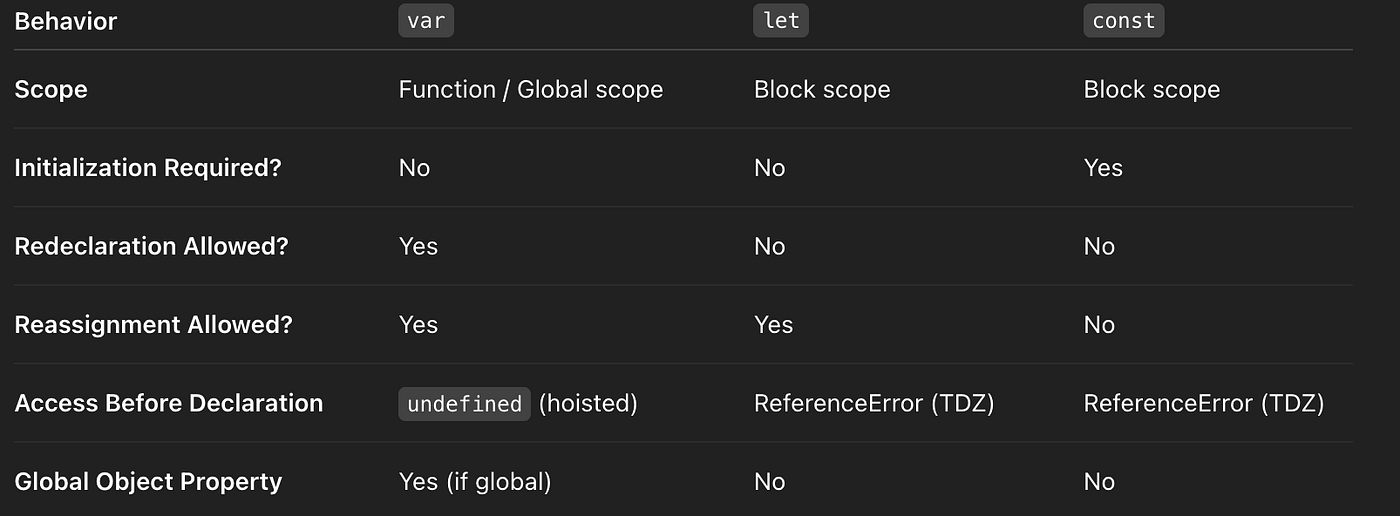
1. The var is a function scoped variable declaration inside a block it can be if or for, var is still accessible outside the block but not outside of the function. let or const both are block-scoped so outside the block variable can't access. they will exist in the block where let or const are declared.
2. The var is able to do redeclare and reassignment of a variable values. let is able to do reassigned but cannot be redeclared in the same scope. const cannot reassign or redeclare. It must be initialized at declaration time.
3. In the case of hoisting all three are hoisted, but behavior differs. var is hoisted and initialized with undefined. let and const are hoisted but not initialized, which leads to a ReferenceError if accessed.
Hoisting
Hoisting refers to the process where interpreter move declaration of functions, and variables to top of their scope, to execute the code. Hoisting is JavaScript's default behavior of moving declarations to top. In similar words, a variable that can be used before it has been declared. Initializations are not hoisted, they are only declarations. var variables are hoisted by showing undefined, while let and const are hoisted but they remains in Temporal Dead Zone until they are initialized.
Before going to learn more about Hoisting, it's important first to understand about Temporal Dead Zone Variables are defined with let and const are hoisted to the top of the block, but not initialized. The block of code is aware of the variable, but it cannot be used until it has been declared. Using a let variable before it is declared will result in a ReferenceError. The variable is in a "temporal dead zone" from the start of the block until it is declared.
What is scope ?
The scope is the said to be the current context of execution in which the values and the expressions that are "visible" or can be referenced in the block. If a variable or expression is not in current scope, it will not available for use. Scopes can also layered in a hierarchy, so that child scopes have access to parent scopes, but it not possible to vice versa.
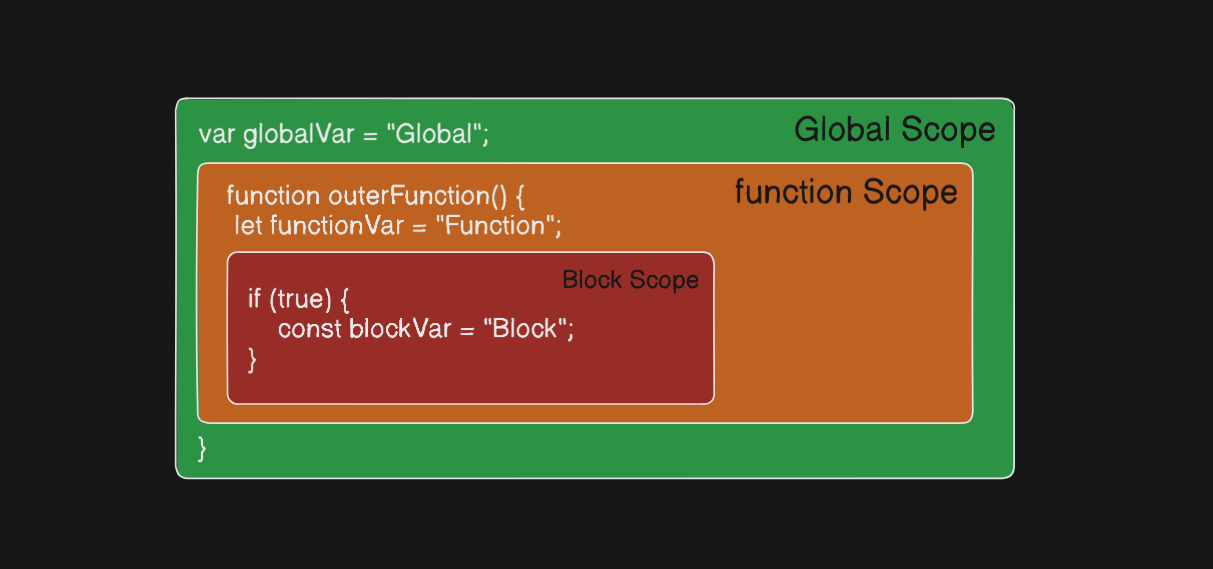
Global scope: The default scope for all code running in script which is globally accessible. Function scope: The scope created with a function is accessible in function. Block scope: The scope that created with a pair of curly braces is block accessible.
let one = "global"           // Global scope

function test() {
  var two = "function"       // Function scope

  if (true) {
    let three = "block"     // Block scope
    var four = "inblock"

    console.log(one)       // global
    console.log(two)       // function
    console.log(three)     // block
  }

  console.log(four)       // var in block
  console.log(three)      // Error (block scoped)
}

test();

console.log(two);        // Error (function scope)


